


Dynamics Business Central (NAV)
Public Group
Active 2 days ago
Experts:




Planning Worksheet Ignoring Existing Production Orders
-
Planning Worksheet Ignoring Existing Production Orders
Posted by DSC Communities on June 20, 2018 at 11:16 am-

Adam Aponte
MemberJune 20, 2018 at 11:16 AM
Hey there NAVUG,How do I get the planning worksheet to stop recommending production orders for items that already have production orders created? We’re constantly running into this issue. The planning worksheet will give us a recommended due date of 6/20/18. If we accept action message with that date, no issues. If we change the due date to 6/25/18 then accept the action message, when we run the planning worksheet again, that item reappears with the original due date it suggested. Why won’t it take into account existing production orders irregardless of dates? We have the same issue on the Requisition Worksheet. Thank you in advance for your help.
——————————
Adam Aponte
Dynamics NAV Support Tech
Zefon International
Ocala FL
—————————— -
?Check to see if you have some demand (sales order) on 6/20 that you don’t have enough inventory for. It could also be a Lead Time issue.
——————————
Lewis Rosenberg
IT Manager
Mars Fishcare
Chalfont PANAVUG Board of Advisors, Programming
NAVUG Programming Committee
NAVUG Membership Committee
——————————
——————————————- -
Adam Aponte
MemberJune 20, 2018 at 1:08 PM
Thanks Lewis.To give you an example, Item A has a Reordering Policy of Fixed Reorder Qty, there are zero in stock, and there is no demand. There are 50 on a production order with a due date of 7/9/2018 and the Reorder Quantity is 50. If there is no demand then why doesn’t NAV accept the date I gave it instead of continuing to recommend a completely new order? It’s almost as if the planning worksheet doesn’t take into account production orders already created. Is there some sort of code that can be modified to force the planning worksheet to recognize existing production orders before making recommendations?
I also checked into the lead time but nothing changes even if I modify the Lead Time Calculation. Please help. Thank you.
——————————
Adam Aponte
ERP Software Specialist
Zefon International
Ocala FL
——————————
——————————————- -
Hi Adam,
Do you have a reorder point or safety stock?-Rob
——————————
Robert Jolliffe MCSE, MCS – NAV Manufacturing Expert
President
Sabre Limited
Cambridge
robert@sabrelimited.com
http://www.sabrelimited.com
——————————
——————————————- -
Adam,
You answered your own question. Your Item is a Fixed Reorder Policy, so you can ignore the Sales Order at this point. Your Item has a Reorder Point (even if it is Zero), and has 0 (Zero) On Hand Quantity. Since the Item is at or below the Reorder Point today, it wants to get stock on the shelf today (actually the day after you hit your Reorder Point). Since the Item has a Reorder Quantity of 50, that is why it suggests a Production Order for 50.
If you push your Due Date out in the future, the system still wants the stock to be replenished today, the day you hit or went below your Reorder Point.
Eventually the Sales Order is going to consume the 50, and it will suggest another Production Order to complete the day after the Reorder Point is hit in the future.
The system is NOT suggesting the order because of the Sales Order, that is just a factor that decreases your stock in the future. The system is suggesting the 50 because you are at or below your Reorder Point.
The Fixed Reorder Policy makes suggestions based on Stock Levels. Demand decreases the stock level which causes the system to replenish stock. But make no mistake, the suggestion is not based on the demand it is based on your stock levels.
If you want the system to suggest orders based on demand you would need to consider the Lot-for-Lot Policy, which I think is the most flexible, or the Order policy.
Hopefully this helps shed some light on your suggestions.
——————————
Ben Baxter
Consultant
Accent Software, Inc.
Carmel IN
——————————
——————————————- -
Jeffrey Mantz
MemberJune 28, 2018 at 12:17 PM
I work with Adam and have seen what he is talking about. What Ben said is sort of what we are struggling to understand:Since the Item is at or below the Reorder Point today, it wants to get stock on the shelf today (actually the day after you hit your Reorder Point). Since the Item has a Reorder Quantity of 50, that is why it suggests a Production Order for 50.
If you push your Due Date out in the future, the system still wants the stock to be replenished today, the day you hit or went below your Reorder Point.
If you hit your reorder point, how can NAV expect you to replenish your stock the same day you hit the reorder point? Some of these items have lead times of 1-2 weeks. So when NAV suggests a due date of today, we have to manually change it to accurately reflect when it will be built. But them the next time you run plan it wants a new order due today again.
——————————
Jeffrey Mantz
Zefon International
——————————
——————————————- -
Robin Mitschke
MemberJune 21, 2018 at 6:15 AM
?There is a column you can bring over on the production order called planning flexibility – if you choose this option it will take the order for what it is and not change it. I have no used it but have read about it. Check that out – maybe it will help you.——————————
Robin Mitschke
MRP/Purchasing Specialist
PECKHAM, INC
LANSING MI
——————————
——————————————- -
Donna Schuman
MemberJune 21, 2018 at 8:22 AM
We are in process of testing many planning parameters as we implement Navision planning, and are also experiencing this intermittently. We have not identified the key yet, but we recently learned that safety stock/reorder point will not work without an SKU item, even if you do not utilize multiple locations. Hope this works.——————————
Donna Schuman
Opportunities, Inc.
Fort Atkinson WI
——————————
——————————————- -
Jenn Claridge
MemberJune 21, 2018 at 9:23 AM
?Hi AdamBen suggestion is the one I would try first. As mentioned with Fixed reorder that is driving your planning suggestions and not the sales order. It is based on your Projected Availability. You may want to look at leveraging a different reordering policy. Lot for Lot would allow you to consider safety stock and on hand inventory and you could use an order modifier for specific quantities. Given you are seeing the issue so quickly after creating the original plan I would think this is the culprit. I would suggest changing the reordering policy and running some test scenarios though in a Pilot.
Another thing to consider (if you say it happens a lot it could be a combination of the above as well as other things), I have seen in the past that the production orders get ignored if production has started and there are ledger entries associated. NAV thinks you can’t change the Production Order because it has been started, so it suggests a new order to meet the demand. This was with older versions I believe.
Hope this helps.
——————————
Jenn Morton
Manufacturing Consultant
Sabre Limited
Cambridge Ontario Canada
——————————
——————————————- -
Tom Feldmann
MemberJune 21, 2018 at 11:49 AM
All good info from everyone. You might want to check out the Time Bucket field too if you stick with Max qty/fixed reorder:——————————
Tom Feldmann
TechniBlend
New Berlin WI
——————————
——————————————- -
John Grant
MemberJune 22, 2018 at 12:19 PM
Adam – If you do not have any other demand in the system and have a ‘future’ Production Order as you described than adding a value in the Time Bucket for the item to have planning go out far enough to include the future Prod Order will prevent an suggested prod order to be generated in the Planning Worksheet – the system will find the future Prod Order. If you do have dependent demand you would get additional lines in the planning worksheet depending on dates.One note if using SKU’s you will want to set in Mfg setup the Blank Overflow Level value to ‘Use Item/SKU Values only’.
Best Regards
——————————
John Grant
Senior Application Consultant
Innovia Consulting
——————————
——————————————- -
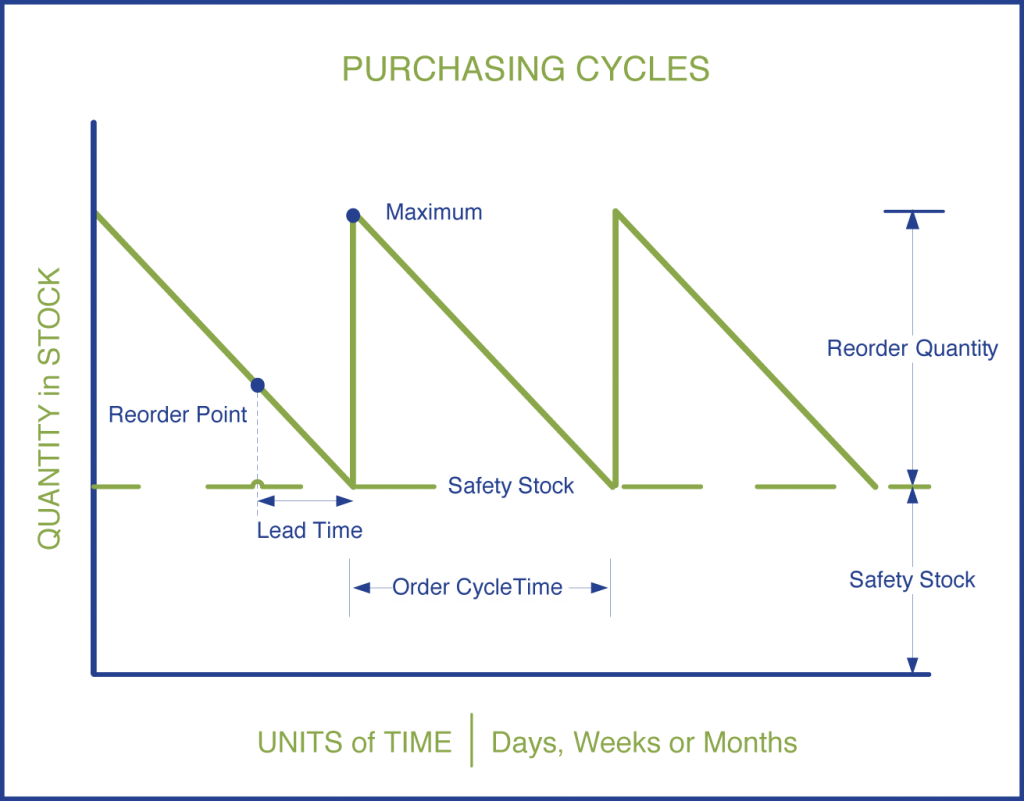
Planning worksheets work in a sawtooth pattern, taking into account Lead Time, reorder point, safety stock and others. Whether a Purchase or production order, it works the same. When you created a reorder point (as you stated and Ben pointed out) that acts as the demand. Your system has 0 on hand, the reorder point will trigger the demand that needs to be satisfied immediately. Your Order is to late to meet that demand. So the system is asking you to create a supply now. To test, eliminate the reorder point and re run the planning sheet and the demand should go away, if not there is another “demand” that is in the setup driving the immediate need (Assuming no forecast) The picture below shows how things may affect the Saw tooth algorithm that planning engine uses.
——————————
Pat Reyes
Head of IT
Sun Basket
San Jose CA
——————————
——————————————- -
Adam Aponte
MemberJuly 3, 2018 at 8:55 AM
Thank you everyone for all your answers.The two answers that I found most helpful were and .
From Ben’s explanation, I now understand that no matter what parameters you set for an item, if it’s a fixed reorder quantity and there’s nothing in stock, the system will continue to recommend orders until the item is in stock, even if you have a production/purchase order for that item.
From John’s explanation, I now understand that if there is at least one item in stock and you set the Time Bucket, NAV will find production/purchase orders within that time bucket and consider them when planning. I have tested this and it works. This has definitely decreased the amount of suggestions we have been receiving. ??
——————————
Adam Aponte
ERP Software Specialist
Zefon International
Ocala FL
——————————
——————————————-
DSC Communities replied 7 years, 10 months ago 1 Member · 0 Replies -
-
0 Replies
Sorry, there were no replies found.
The discussion ‘Planning Worksheet Ignoring Existing Production Orders’ is closed to new replies.
