


Dynamics Business Central (NAV)
Public Group
Active 3 days ago
Experts:




Permanent Customer Notes
-
Permanent Customer Notes
Posted by Laura Kuebler on August 15, 2019 at 1:25 pm-
We are looking for a process to post permanent customer notes that show up to shipping and accounting from the sales order process. We are currently on NAV 2018.
We can’t find permanent notes that travel with an order through the various departments.
——————————
Laura Kuebler
American Art Clay Co
Indianapolis IN
—————————— -

Cynthia Priebe
MemberAugust 15, 2019 at 3:38 PM
Laura,Using Comments on the Customer card is a standard, though relatively basic option that I have seen extended to meet this requirement.
Add a field “Copy to Sales Doc” to Table 97 – Comment Line with the field visible on the comment page when viewed through the customer card. You can set the default value to whatever makes sense for your organization. Modify the creation of sales documents so that when this field is checked, the comments are added to the sales document’s header comments when the Customer is inserted. The Sales & Rec Setup that defines when to copy comments from Blanket -> Order -> Invoice and Shipment takes over from that point. If you need the comments on the order to copy to Warehouse Shipment or Pick, you would need additional modifications.
Let me know if this is a possibility or maybe too simple a solution. A specific example of “permanent notes that travel with an order through the various departments” and where they should be seen might be helpful to better understand your requirement.
——————————
Cynthia Priebe MCP, DCP
Senior Analyst and Project Manager
Liberty Grove SoftwareI would love to see you at Summit 2019!
GET67 – Small Changes with Big Impact: Core Application Setup and Configuration
ADM60 – Mods: Just Because Everyone Does Them Doesn’t Mean You Should
FIN58 – (with Andrea Riviezzo) My AP Person Just Left, Now What?
——————————
——————————————- -
Cynthia,
Thank you so much for responding – we have asked our consultants many times on how to do this and never got a straight answer. We did have a modification done for our shipping comments that are traveling clear to the shipping department but can’t find out how to put a permanent customer note and have it visible. We will try this suggestion. Do you have a suggestion on how to have it show up on the screen when you go to process an order with this customer that there comment is visible to the order entry people then?——————————
Laura Kuebler
American Art Clay Co
Indianapolis IN
——————————
——————————————- -
Laura,
You actually own a product, called Pop-Up Notes, that will help with your request. Your partner should be able to assist you as it takes about 15 minutes to setup.
Best Regards,
——————————
Ben Baxter
Consultant
Accent Software, Inc.
carmel IN
——————————
——————————————- -
Cynthia Priebe
MemberAugust 16, 2019 at 10:00 AM
the first thought is to add a link to the header comments in a fact box, but that is still a click to see them and not what I think you are asking for. So, I might recommend adding a FastTab for “Comments” to the Sales Document pages. Whether the comments are editable or not from the page, if they include header and line comments, how this would be indicated, where the FastTab is placed are just a few of the design issues you will want to consider.I hope you find this suggestion helpful. I would usually ask more questions before making a recommendation, but this should point you in the right direction to take up the conversation again with your partner.
——————————
Cynthia Priebe MCP, DCP
Senior Analyst and Project Manager
Liberty Grove SoftwareI would love to see you at Summit 2019!
GET67 – Small Changes with Big Impact: Core Application Setup and Configuration
ADM60 – Mods: Just Because Everyone Does Them Doesn’t Mean You Should
FIN58 – (with Andrea Riviezzo) My AP Person Just Left, Now What?
——————————
——————————————- -
I’ve built this exact modification myself. Copies comments from the Customer Card to the Sales Order. Automatically popped up in a separate screen as well as soon as the Sell-to Customer No. was added. They had to acknowledge it before putting the rest of the order.
——————————
Matt Traxinger
NAV Developer
ArcherPoint Inc.
San Antonio TX
——————————
——————————————- -
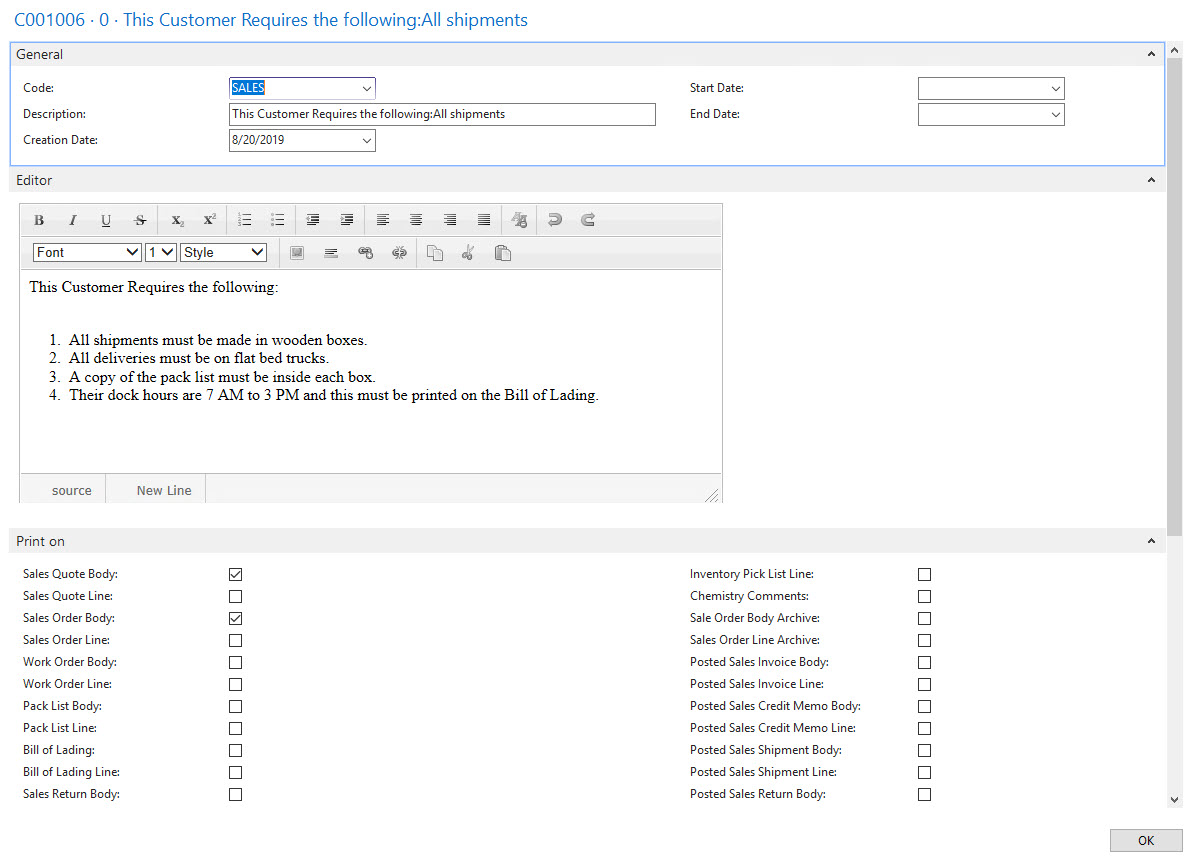
We had comments out of control. We had created a separate comments file for shipping notes. We had Pop Up Notes and of course we customized it for our use. When all was said and done we ended up printing the same comment multiple times on a document because we were moving in too many directions. Finally we made a matrix of where we wanted to print comments and where we wanted to enter comments. This resulted in us creating our own comments function. We created check boxes for every possible document where we may want a comment printed.

Then we took it to whole new level by adding a comments editor. When we click on New or Edit in the ribbon, it opens the following editor:
——————————
Gregory Alford
Director of Technical Resources
Tri Star Metals LLC
Carol Stream IL
——————————
——————————————- -
Gregory, This is awesome, It sounds like your company is very similar to ours in being comment heavy in every area. Where are you having this print and are you able to only show it internally only too? I would to know more about this customization – did you create it or have it done by your provider?
——————————
Laura Kuebler
American Art Clay Co
Indianapolis IN
——————————
——————————————- -
Hi Laura – contact Ron Skalski at Ron.Skalski@Sikich.com if you want to talk to our developer.
——————————
Gregory Alford
Director of Technical Resources
Tri Star Metals LLC
Carol Stream IL
——————————
——————————————- -
We can print on virtually any document. We can also check off whether to associate the comment with a line or as part of the document body (below the lines). We had this done by Sikich.
——————————
Gregory Alford
Director of Technical Resources
Tri Star Metals LLC
Carol Stream IL
——————————
——————————————-
Laura Kuebler replied 6 years, 10 months ago 1 Member · 0 Replies -
-
0 Replies
Sorry, there were no replies found.
The discussion ‘Permanent Customer Notes’ is closed to new replies.
