


Dynamics Business Central (NAV)
Public Group
Active a day ago
Experts:




Nav Development Environment
-
Nav Development Environment
Posted by DSC Communities on March 6, 2019 at 7:37 pm-

Robyn Hawthorne
MemberMarch 6, 2019 at 7:37 PM
I have a laptop that has an issue connecting to the Nav Development Environment. It gets this error: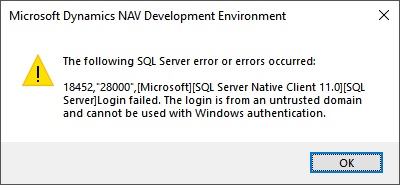 The computer runs Windows 10 and uses a local account which matches the domain authentication rather than being a domain member. We have set windows credentials to allow the computer to access the SQL server which allows Nav 2017 to run just fine. But the Nav Development Environment doesn’t seem to like the setup. It was working until recently when we removed all the credentials to try and fix an issue where the Nav Development Eviro gave this same error when using VPN.
——————————
Regards,Robyn Hawthorne
Magnum Concrete Inc.
Aldergrove BC
—————————— -
Joel Baines
MemberMarch 7, 2019 at 7:55 AM
RobynThe first thing that comes to mind is WINDOWS FIREWALL.
——————————
Joel Baines, PMP, MCP
Navision and EDI Business Analyst
Oakville ON
——————————
——————————————- -
Robyn,
Can you try doing a <Shift> + Right Click on the Development environment Shortcut and do “Run as Different User”. When entering your credentials make sure to use your domain username.
When you are talking about your computer setup with SQL Server, are you saying you can run the Window’s Client Just Fine?
Thanks,
Joe Draeger
——————————
Joe Draeger
Ortho Molecular Products, Inc
Woodstock IL
——————————
——————————————- -
Robyn Hawthorne
MemberMarch 7, 2019 at 9:59 AM
Thank you Joe,Yes, I can run the windows client fine (after the entry in the credentials manager). It’s just the developer enviro that I get this error with. I tried your suggestion and got the same error unfortunately.
——————————
Regards,Robyn Hawthorne
Magnum Concrete Inc.
Aldergrove BC
——————————
——————————————- -
Robyn Hawthorne
MemberMarch 7, 2019 at 2:43 PM
I found the issue – when we were testing the VPN connection, we changed the user password and then failed to update the credential manager password. Thank you for your suggestions.The Developer still doesn’t connect through VPN, but that’s not so critical.
——————————
Regards,Robyn Hawthorne
Magnum Concrete Inc.
Aldergrove BC
——————————
——————————————-
DSC Communities replied 7 years, 3 months ago 1 Member · 0 Replies -
-
0 Replies
Sorry, there were no replies found.
The discussion ‘Nav Development Environment’ is closed to new replies.
