


Dynamics Business Central (NAV)
Public Group
Active 6 days ago
Experts:




Mass Update Production BOMs
-
Mass Update Production BOMs
Posted by DSC Communities on January 8, 2020 at 6:32 pm-

Neil Cates
MemberJanuary 8, 2020 at 6:32 PM
Hello,Don’t think that there is an easy way to to do this but…worth checking. We have multiple production BOMs where we need to add a new item. Is there any automated way to add the same item# to multiple BOMs?
The only thing remotely close that I can think of is RapidStart. However, do not think RS will work for this as the need is to insert new lines on the BOM, not change data already in the table.
Anything other than a manual process?
——————————
Neil Cates
Beckwith & Kuffel
Seattle WA
—————————— -
Jason Nicolaou
MemberJanuary 9, 2020 at 6:54 AM
Not sure which version you are on, but in D365BC lines can be added. I haven’t tried a BOM yet. All I am saying is that I encourage you test it on BOM’s. If you are not in BC SAAS then you may need to approach this from the SQL side or direct writes to the tables as Edit in Excel isn’t available on the BOM page.Please share what you implement with the group. Best of luck!
——————————
Jason Nicolaou
Engagement Manager
Sikich, LLP
——————————
——————————————- -
Samuel Champoux
MemberJanuary 9, 2020 at 8:12 AM
?Why do you say you can’t insert things with RapidStart?
I did that before and it works well.——————————
Samuel Champoux
IT Director
Drummondville QC Canada
——————————
——————————————- -
Alfredo Zelaya
MemberJanuary 9, 2020 at 8:27 AM
NeilI think you can use RapidStart for this task. Remember your writing to the line not the header:
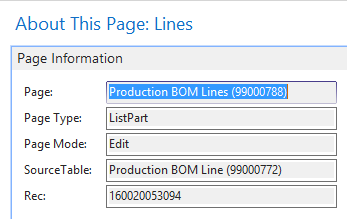
Export the current values and add the new lines. You should be fine.——————————
Alfredo Zelaya
Sr. Systems Analyst
Megadyne Americas LLC
Fairfield NJ
——————————
——————————————- -
You’ll have to make sure that your BOMs are not in a certified status when using RapidStart to update them.
——————————
Lewis Rosenberg
IT Manager
Mars Fishcare
Chalfont PA
————————————————————————
BCUG/NAVUG All-Star
BCUG/NAVUG Board of Advisors, Chairperson
BCUG/NAVUG Programming CommitteeTwitter: @RosenbergL
LinkedIn: https://www.linkedin.com/in/rosenbergl
————————————————————————NAVUG/D365BC-User Group Focus
May 18-19, 2019
Denver, Colorado
——————————
——————————————- -
Neil Cates
MemberJanuary 9, 2020 at 12:54 PM
Here is what I don’t understand about this. If I look at the data in the Production BOM Line table, each item entered on the BOM has a line number. I tried a test update on one BOM Line using RapidStart. I entered a new item but – I left the line number blank. I did Validate and it showed no errors. I applied the data and the new item was added to the BOM. I went back to RS to export the Excel – to look at the data after the update/add of the item. The new item came in with a line number of 0. If I update multiple BOMs – do I care if all of the new entries have a line number of 0?——————————
Neil Cates
Beckwith & Kuffel
Seattle WA
——————————
——————————————- -
Alfredo Zelaya
MemberJanuary 9, 2020 at 3:14 PM
NeilMaybe I’m too “Old School” but i would use the next available line number:
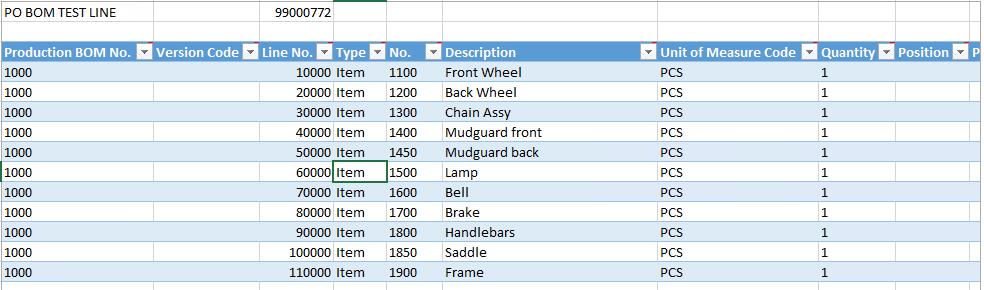
In the case above, I would use line 120000, to be consistent.——————————
Alfredo Zelaya
Sr. Systems Analyst
Megadyne Americas LLC
Fairfield NJ
——————————
——————————————- -
Neil Cates
MemberJanuary 9, 2020 at 4:27 PM
That’s the problem. If I am updating multiple BOMs – the line numbers are not consistent throught all of the BOM records. I don’t know how the system determines what line# to use but – if I have 25 BOM records, each with 25 items on the BOM, the line numbers on each will be different. If I have to find an available line number, on all records, could take some time. I could put in a number that is sufficiently large, so as to not likely be on any of the records, or I could search the Excel file for – random number – until I find one not on any record, and use that. This seems odd to me though and am not too comfortable using this approach.——————————
Neil Cates
Beckwith & Kuffel
Seattle WA
——————————
——————————————- -
David Chiu
MemberJanuary 10, 2020 at 9:08 AM
?Hi Neil,
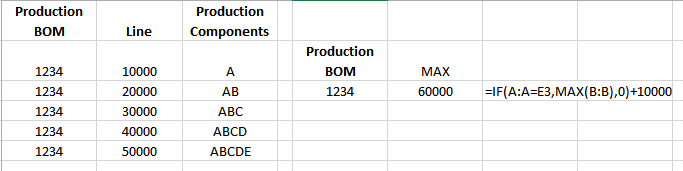
A possible solution could be:- Run a query that pulls the Production BOMs for your 25 items.
- Complete a RapidStart worksheet
- For the Line Nbr, do an If statement to pull the MAX line for that Production BOM and add 10000 to it. (see example of the formula below)
——————————
David Chiu
Acoustic Ceiling Products
WI
——————————
——————————————- -
I haven’t worked directly with production BOMS but I have with other comparable tables. If you do a copy/paste and exclude the field for the line number NAV will figure out what the next line number should be and will assign it for you.
——————————
Chris Gittins
Storm Products, Inc.
Brigham City UT
——————————
——————————————- -
Neil Cates
MemberJanuary 10, 2020 at 2:52 PM
Wanted to thank everyone for the replies. I have decided to just have these updated manually and move on. The research and testing was taking more time than just doing it manually. It was interesting and would have liked to kept working with it but….——————————
Neil Cates
Beckwith & Kuffel
Seattle WA
——————————
——————————————- -
Neil,
We do things like this often (add, remove, replace, change values, comments, etc., to routing and boms, sometimes in the 1000’s) and have been using different development objects depending on the scenario (XMLPort, Report, Codeunit). Unfortunately, for us anyway, every request is slightly different so coming up with one all-encompassing modification is a challenge. As we’ve evolved over many years we continued to massage the same logic (objects) to satisfy user requests. If you don’t have an internal developer, you could consult with your partner for these type of data requests, it’s likely the cost of development will be lower than you doing it manually. If you’ve a NAV admin that’s interested in the development tools (and you’ve the license for NAV development tools), it’s probably something you could manage internally once your NAV admin understands the data structures within NAV and the development tools.
John Bellinger
Business Systems & Applications Manager
Office: 952-392-3912 | Cell: 612-719-0289
Activar, Inc.
9700 Newton Ave. S. | Bloomington, MN 55431
jbellinger@activar.com | http://www.activar.com
——Original Message——
Wanted to thank everyone for the replies. I have decided to just have these updated manually and move on. The research and testing was taking more time than just doing it manually. It was interesting and would have liked to kept working with it but….
——————————
Neil Cates
Beckwith & Kuffel
Seattle WA
——————————
DSC Communities replied 6 years, 5 months ago 1 Member · 0 Replies -
-
0 Replies
Sorry, there were no replies found.
The discussion ‘Mass Update Production BOMs’ is closed to new replies.
