


Dynamics Business Central (NAV)
Public Group
Active 5 days ago
Experts:




Manifest Upload Issues
-
Manifest Upload Issues
Posted by DSC Communities on December 10, 2018 at 12:51 pm-

Joe Novak
MemberDecember 10, 2018 at 12:51 PM
Hello everyone,Every once in a while we have an issue with our manifests uploading successfully specifically with UPS. We receive an email from UPS about once every 2 months or so advising we are missing billing info for a days worth of tracking numbers typically between eighty to ninety depending on the day.
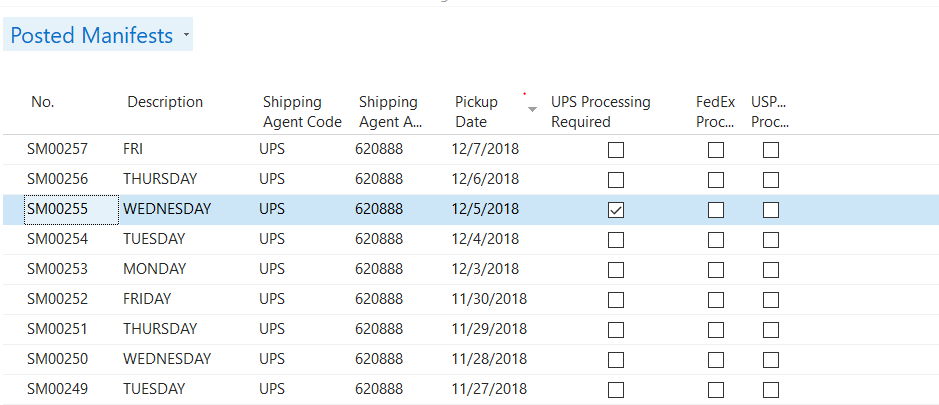
We can find the file in posted manifests based on the “UPS Processing Required” being checked. We have been told by our vendor that only they can fix this as UPS has not upgraded their software yet to accept a wider variety of uploads. Also we use Lanham E-ship. Our vendor said that Lanham will not work with the end user on these manifest issues only the vendor. I called Lanham and they confirmed what our vendor advised.
I just wanted to reach out and see if anyone has been able to fix these issues on their own or if we are required to work with our vendor permanently to resolve manifest upload problems.
——————————
Joe Novak
Purchasing
Lesman Instrument Company
BENSENVILLE
—————————— -
Darryl Anunson
MemberDecember 11, 2018 at 2:04 PM
Hey Joe. We ran into this exact issue, the Manifest Posting without UPS Processing when converting our shipping workstations to Windows 10. In the Lanham setup documentation, it references making sure the user has admin access to the UPSLink directory. What we found is the user must also have Admin access to the NAV installation directory on the local workstation. It could be one workstation isn’t fully set up like this (of course all other setup instructions must be followed) that could lead to this being intermittent.This may not be the case for you, but I know it was an issue we had to work through.
——————————
Darryl Anunson
NAV Administrator
pcnametag, Inc.
Verona WI
——————————
——————————————- -
Justin Falconer
MemberDecember 12, 2018 at 10:00 AM
We have had this issue also, You need the correct File Level Permissions, and there is also a Registry Key that the User must have access to.
The other thing we found out is the File Locations need to be on the local system and not on a UNC Path.This is from the UPSLink Setup Troubleshooting Documents
Users should have Full Windows permissions to the following directories:
a. Carrier Packing Station:
i. UPS Manifest Upload
ii. UPSlink Temp. Files
iii. UPS Buffer Fileb. Program Files:
i. Microsoft Dynamics NAV
ii. UPSc. Registry Key Name:
i. 64 bit Windows:
HKEY_LOCAL_MACHINESOFTWAREWow6432NodeUPS
ii. Other:
HKEY_LOCAL_MACHINESOFTWAREUPS2. For RTC
a. External components need to be installed on the NAV Server and any
client computer that will be used to send UPS manifests.
b. Run “Setup Additional Workstations” from UPSlink Setup on the NAV
Server and any client computer that will be used to send UPS
manifests.
c. Set SHELL Command Type on the Label and Printing tab in Packing
Station to .NET Automation.Attached is how our Carrier Packing Station are setup for UPS
——————————
Justin Falconer
IT Manager
Tender Corporation
Littleton NH
——————————
——————————————- -
Justin Falconer
MemberDecember 12, 2018 at 10:05 AM
Lanham Services will work Directly with End Users (You need to setup a contract with them for Direct Support)
Lanham Associates Does not work with End Users directlyThey are really the same company just 2 different divisions. We use Lanham Services for all of our EDI and EShip support bypassing our NAV Partner.
You can also Re-Post the Manifest your self, no need to contact your partner to do this.
If you open the Manifest in question click on the Actions Tab and Press the Option for Repost Manifest——————————
Justin Falconer
IT Manager
Tender Corporation
Littleton NH
——————————
——————————————-
DSC Communities replied 7 years, 6 months ago 1 Member · 0 Replies -
-
0 Replies
Sorry, there were no replies found.
The discussion ‘Manifest Upload Issues’ is closed to new replies.
