


Dynamics Business Central (NAV)
Public Group
Active 2 hours ago
Experts:




How do I link a report with value from marked line
-
How do I link a report with value from marked line
Posted by DSC Communities on July 27, 2018 at 8:26 am-

Peter Christoffersen
MemberJuly 27, 2018 at 8:26 AM
Hi there,I have added a report to a page in object designer, and it works fine, but I would like it to be linked with the line that is marked once opened. As it is now, it opens up with no value in “number” – I would like this field to auto-populate based on the marked line.
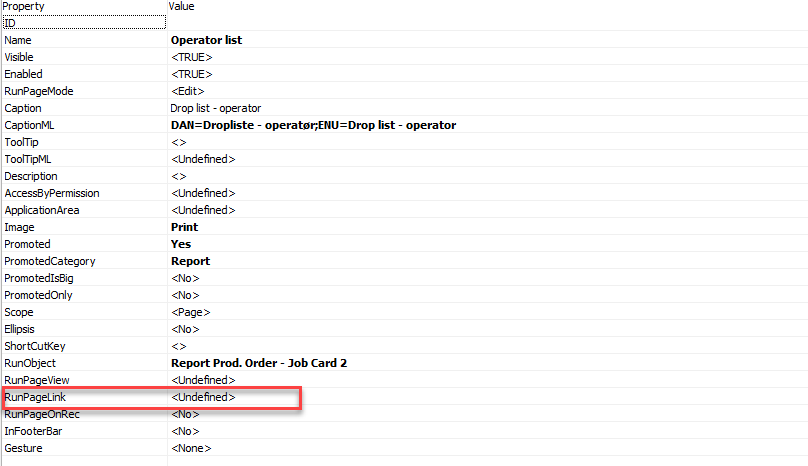
I have inserted the properties for the report that I have inserted, and I would assume that this link was made in “RunPageLink”, but the assist button is inactive, and I can therefore not make the link.
What am I missing here:)…?
——————————
Peter Christoffersen
Carsoe US Inc
Seattle WA
—————————— -
Peter, Have you figured this out yet? If you could rephrase what you are trying to do, I might be able to help. From what you’ve written, it seems you want to open a report with a filter from the “marked” line(s).
——————————
Jon Long
Director of ArcherPoint-Upgrades
ArcherPoint Inc.
GA
——————————
——————————————- -
Peter Christoffersen
MemberJuly 28, 2018 at 12:36 PM
Hi Jon,Still struggling:)
Yes, I have made a report available in our time reg. page that shows which items have been picked for a given production order – the problem is that when you open the report, you have to select which production order to filter – I would like it to auto populate the report-window with the value from the line currently marked.
Does that make sense?
Best regards
Peter
——————————
Peter Christoffersen
Carsoe US Inc
Seattle WA
——————————
——————————————- -
Franz Kalchmair
MemberJuly 29, 2018 at 10:20 AM
you could add following code to the action instead of setting RunObject://local var.: prodOrder | record | production order
CurrPage.SETSELECTIONFILTER(prodOrder);
REPORT.RUN(REPORT::”Prod. Order – Job Card”,TRUE,FALSE,prodOrder);——————————
Franz Kalchmair
Microsoft MVP
Senior Consultant
Austria, Europe
——————————
——————————————- -
Peter Christoffersen
MemberJuly 30, 2018 at 3:01 AM
It works now:)However, when I try to run the report the second time, I get the following error:
The object has been run. Use the function CLEAR(Report).
What can I do to work arround that?
——————————
Peter Christoffersen
Carsoe US Inc
Seattle WA
——————————
——————————————- -
Franz Kalchmair
MemberJuly 30, 2018 at 3:11 PM
could be a build bug.i tested a couple of times with nav 2017 build 17972. no problems.
download a newer build and test again.
——————————
Franz Kalchmair
Microsoft MVP
Senior Consultant
Austria, Europe
——————————
——————————————-
DSC Communities replied 7 years, 9 months ago 1 Member · 0 Replies -
-
0 Replies
Sorry, there were no replies found.
The discussion ‘How do I link a report with value from marked line’ is closed to new replies.
