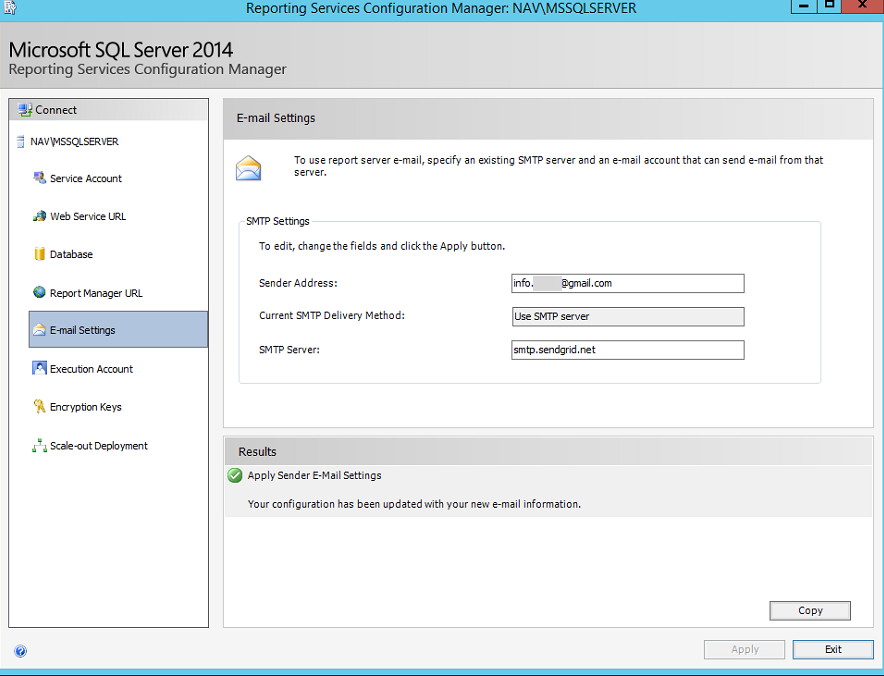
failure sending mail: The SMTP server requires a secure connection or the client was not authenticated. The server response was: 5.7.57 SMTP; Client was not authenticated to send anonymous mail during MAIL FROM
-
failure sending mail: The SMTP server requires a secure connection or the client was not authenticated. The server response was: 5.7.57 SMTP; Client was not authenticated to send anonymous mail during MAIL FROM
Posted by DSC Communities on March 4, 2020 at 11:43 pm-
Alicja Gaweda
MemberMarch 4, 2020 at 11:43 PM
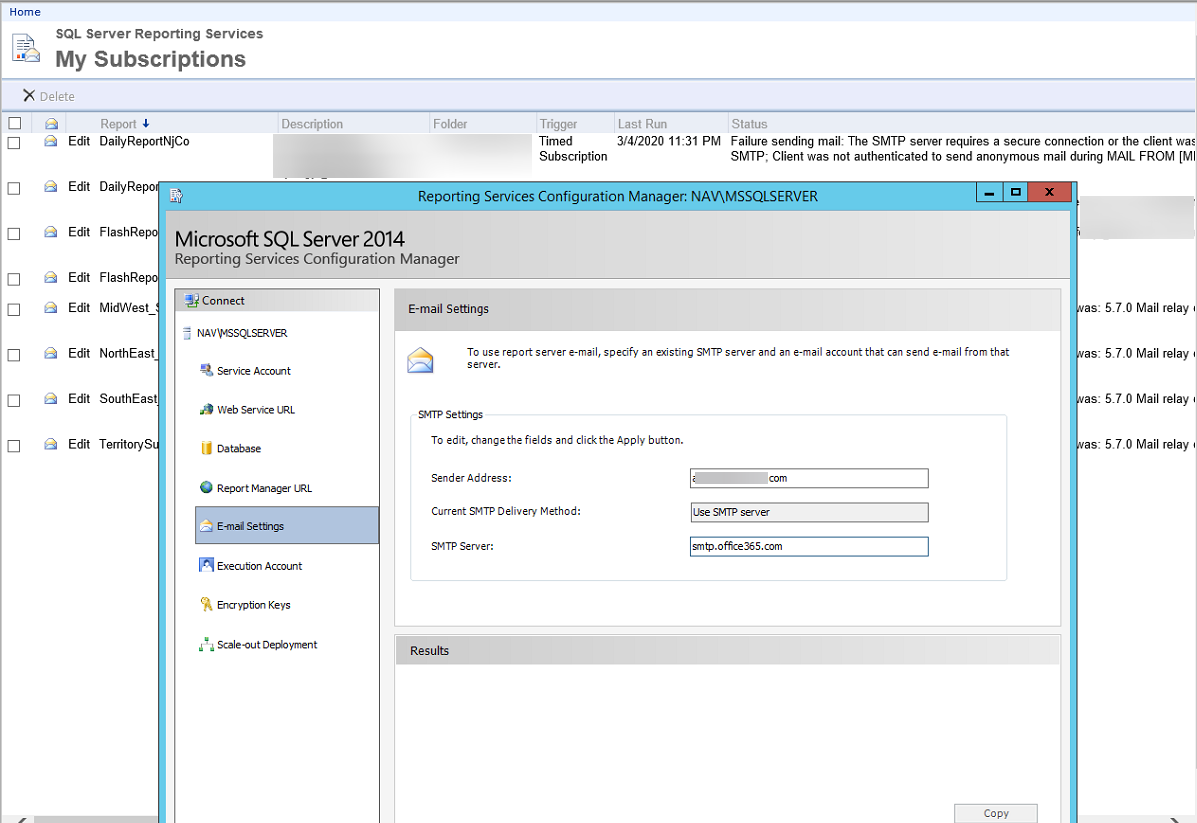
Hello,Getting error after changing sender address email for SSRS reports:
failure sending mail: The SMTP server requires a secure connection or the client was not authenticated. The server response was: 5.7.57 SMTP; Client was not authenticated to send anonymous mail during MAIL FROM [MN2PR13CA0026.namprd13.prod.outlook.com]Mail wil
Where do I enter credentials for the account used in sender address?
Do I need to setup relay or any other setup I might missed?thank you!!
——————————
Alicja
—————————— -
I do not know if this applies to SQL 2014 or not. I have 2018. But SMTP is configured outside of reporting services in SQL Server Management Studio. Expand Management once you’ve connected to your server, and under Management is Database Mail.
——————————
Kyle Hardin
NAV Developer
ArcherPoint Inc.
Duluth GA
——————————
——————————————- -
Roger Neely
MemberMarch 5, 2020 at 11:33 AM
Are you usingĀ office365?
If so, then secure your email with an internal smtp relay installed on IIS.
orĀ Office365.
settings would be:smtp.office365.comEncryption: tls/sslport: 587user: emailpass: yourpass——————————
Roger Neely
OOBE
Greenville
——————————
——————————————- -
Alicja Gaweda
MemberMarch 5, 2020 at 12:35 PM
Hello Roger,
Thank you! Yes, using office 365, could you please let me know where would I need to change those settings at?
thanks!!——————————
Alicja
——————————
——————————————- -
Those settings go where I said in my first reply. SQL Server Management Studio.
——————————
Kyle Hardin
NAV Developer
ArcherPoint Inc.
Duluth GA
——————————
——————————————- -
Alicja Gaweda
MemberMarch 6, 2020 at 3:42 PM
Thanks Kyle!Ā
I did that, and I did receive the test email but the report still failing, same error as before——————————
Alicja
——————————
——————————————- -
KEYUR THAKKAR
MemberMarch 7, 2020 at 4:24 AM
Hi Alicja,
If you are using SQL Server 2014 than you will not be able to use Office 365 directly as it does not support SMTP authentication. If you can make SMTP Relay server and use Office 365. SQL Server 2017 support SMTP authentication.Or you can use any email server like hMail Email Server to shoot email from your SSRS Services.
Thank You
——————————
KEYUR THAKKAR
Manager-IT
BEST VALUE CHEM PVT LTD
VADODARA
——————————
——————————————- -
Alicja Gaweda
MemberMarch 9, 2020 at 5:56 PM
Hello Keyur,thank you for the message!
correct, I’m on SQL Server 2014, setting it up on Database mail is not working and I don’t have the option in IIS to setup SMTP there either..
can you please let me know how do I setup smtp relay for this?thank you!
——————————
Alicja
——————————
——————————————- -
Alicja Gaweda
MemberMarch 10, 2020 at 8:44 PM
Hello,I have gmail account setup with sendgrid smtp relay, I can send as the other email account from gmail no problem, but the SQL subscriptions are still failing
——————————
Alicja
——————————
——————————————- -
KEYUR THAKKAR
MemberMarch 11, 2020 at 12:05 AM
HiĀ Alicja,You are trying to send email as anĀ anonymous without authentication, which is not supported by Office 365 or Gmail. As i said in my earlier reply, SQL Server 2014 Reporting services does not support SMTP Authentication, so you wont be able to send email using these settings.
You can setup SMTP Relay Server and try sending email from it. Please read below page for more detailed information about how to send email from Office 365 from an application.Ā
——————————
KEYUR THAKKAR
Manager-IT
BEST VALUE CHEM PVT LTD
VADODARA
——————————
——————————————- -
Hello NAVUG / D365UG,
For those of you who are struggling with this TLS1.2 and Microsoft Office 365 issue and are on an older version of NAV…Ā
We are on NAV2017, SQL server 2016
This blog solved it for us, scroll down to “Best Answer”
Sql-server ā Enable TLS 1.2 for SQL Server 2016 database mail ā iTecTecI was successful in testing from both NAV RTC SMTP settings and SQL Database Email setup
Hope this helps others.
——————————
Michael Sedlock
VP of I.T.
Dukal Corporation
Ronkonkoma NY
——————————
——————————————- -
Upgrade the SQL server to something that can do modern encryption and authentication.Your options are extremely limited since you can’t authenticate the first SMTP hop.
——————————
Kyle Hardin
NAV Developer
ArcherPoint Inc.
Duluth GA
——————————
——————————————-
DSC Communities replied 6 years, 2 months ago 1 Member · 0 Replies -
-
0 Replies
Sorry, there were no replies found.
The discussion ‘failure sending mail: The SMTP server requires a secure connection or the client was not authenticated. The server response was: 5.7.57 SMTP; Client was not authenticated to send anonymous mail during MAIL FROM’ is closed to new replies.