Data Exchange setup

  • Data Exchange setup

    Posted by Thomas Marks on July 17, 2019 at 1:57 pm
    • Thomas Marks

      Member

      July 17, 2019 at 1:57 PM

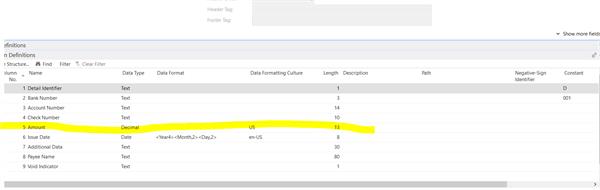
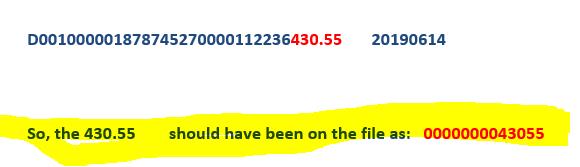
      Currently trying to complete configuration the Positive Pay data exchange definition.Ā  I have it all configured except for one part on the column definitions for the AMOUNT – I can’t figure out how to get rid of the decimal.Ā  The 2nd picture is showing us the response from the Bank.Ā  Anyone have any ideas here!! Please!!!

      dataexchange def

      bankresponse

      ——————————
      Thomas Marks
      Family Brands
      ——————————

    • Ronald McVicar

      Member

      July 17, 2019 at 2:58 PM

      in you definition you should have the ability to set it toĀ text data type field instead of Decimal.

      what version of NAV?

      ——————————
      Ronald McVicar, IT Software Mgr
      NSP (Quality Meats)
      nspproteins.com
      ——————————
      ——————————————-

    • Suresh Kulla

      Member

      July 17, 2019 at 11:56 PM

      Please select on that line, Text Padding Required, and Pad Character and Justification.

      ——————————
      Thanks
      Suresh Kulla
      NAV Technical Architect
      Atlanta GA
      ——————————
      ——————————————-

    Thomas Marks replied 6 years, 9 months ago 1 Member · 0 Replies
  • 0 Replies

Sorry, there were no replies found.

The discussion ‘Data Exchange setup’ is closed to new replies.

Start of Discussion
0 of 0 replies June 2018
Now

Welcome to our new site!

Here you will find a wealth of information created for peopleĀ  that are on a mission to redefine business models with cloud techinologies, AI, automation, low code / no code applications, data, security & more to compete in the Acceleration Economy!