


Dynamics Business Central (NAV)
Public Group
Active 2 days ago
Experts:




Daily Closing Reports
-
Daily Closing Reports
Posted by DSC Communities on November 9, 2017 at 3:24 pm-

Gina Cameron
MemberNovember 9, 2017 at 3:24 PM
My company went live last weekend. The consultants who are helping us have advised us that there is not a daily closing report. I am taken aback by this information.I have staff entering sales orders and paying vendors. Is there not a end-user specific report that would show all the transactions she entered in each area?
Thank you in advance.
Gina
——————————
Gina Cameron
ISM2 Inc
—————————— -
I can think of several options, if your goal is to see the entries posted by a user each day.
1-Run the GL Trial Balance, choosing the detail option and filtering for desired date(s) and user. Two issues here is that you have to run the report, filtering for one user at a time and the user id does not print.
2-Run the G/L Register report, choosing date(s) and user. Same two issues as option 1
3-Go to General Ledger Entries screen, add the user id, filter for date(s), sort the user id column, copy and paste to Excel and your done. I think this is the best option.——————————
Kim Dallefeld
NAV Consultant
Past NAVUG Chair
NAVUG Programming Committee
Ft Worth, TX
Kim@Dallefeld.com
——————————
——————————————- -
Cynthia Priebe
MemberNovember 9, 2017 at 4:04 PM
For AR, the Daily Invoicing Report is commonly used as a check of a day’s work. The report shows oneline for each invoice or credit memo. You can view the bill-to customer number, name, payment terms, salesperson code, amount, sales tax,amount including tax, andtotal of all invoices or credit memos.For AP, there is an AP – Vendor Register. Use this report to print the registers created from posted entries for vendors. The filters allow you to list the document type you are interested in as well as a particular register. I don’t usually recommend this report, as it can get rather lengthy.
My favorite report for seeing transaction activity
related for AP or AR by date and user is the G/L Register Report. This often forgotten report allows you to filter by Creation Date, SourceCodes and UserID. It reports based on GL Activity. You don’t need to print and save the report, it can be rerun at any time. Based on source codes selected, you can include sales, purchase,payments and receipts. I also think the Creation Date is important as a filter as each register posted throughout the day could contain entries with multiple posting dates.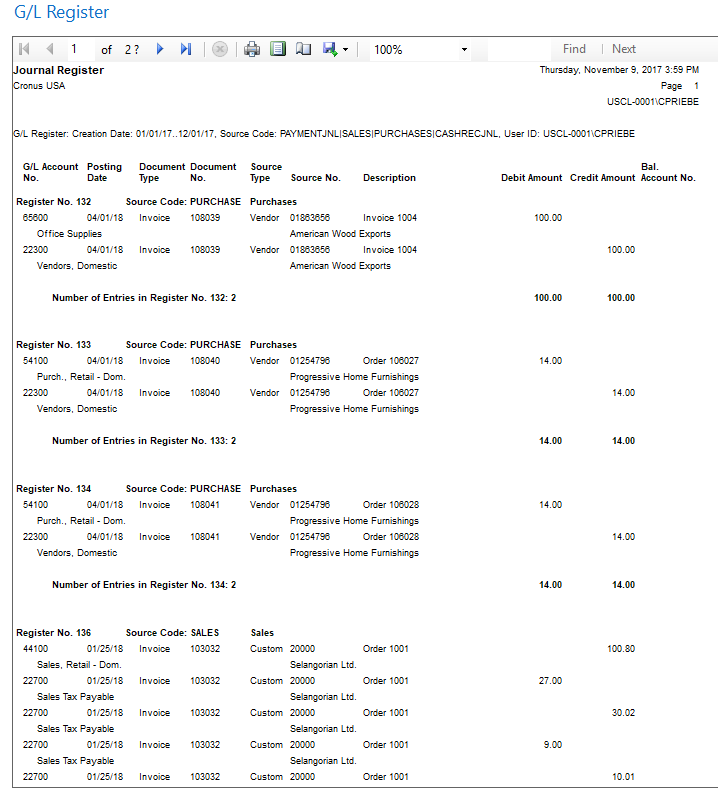
——————————
Cynthia Priebe, MCTS, DCP
Senior Business Analyst and Project Manager
Liberty Grove Software
Grafton OH
——————————
——————————————- -
Richard Trumpess
MemberNovember 13, 2017 at 6:23 AM
Hi Gina,We had a similar problem when going live. We had previously used SAGE which had a standard report showing all transactions created that day.
Eventually we modified the layout of both the Day Book Cust. Ledger Entry and Day Book Vendor Ledger Entry to suit our needs.
Each day, we filter the report (‘greater than’ final transaction of day before) on Entry No. and if necessary you can split it between different Document Type, User ID etc.
I’m far from an expert in these things but I think you might be having similar issues to those which we experienced.
——————————
Richard Trumpess
United Kingdom
——————————
——————————————- -
I don’t think Day Book Cust. Ledger Entry and Day Book Vendor Ledger Entry are reports in the North American version.
Does anyone know of a NA counterpart report(s)?
——————————
Kim Dallefeld
VP Professional Services
Syte Consulting Group
kdallefeld@sytecg.comPast NAVUG Board Chairman
NAVUG Programming Committee
——————————
——————————————- -
Cynthia Priebe
MemberNovember 13, 2017 at 1:44 PM
“Day Book” reports are listed as UK Local Functionality in MSDN.——————————
Cynthia Priebe, MCTS, DCP
Senior Business Analyst and Project Manager
Liberty Grove Software
Grafton OH
——————————
——————————————-
DSC Communities replied 8 years, 6 months ago 1 Member · 0 Replies -
-
0 Replies
Sorry, there were no replies found.
The discussion ‘Daily Closing Reports’ is closed to new replies.
