


Dynamics Business Central (NAV)
Public Group
Active 2 days ago
Experts:




Checks are not printing with the proper address format
-
Checks are not printing with the proper address format
Posted by DSC Communities on March 13, 2018 at 11:54 am-

Archana Kulla
MemberMarch 13, 2018 at 11:54 AM
HiWhen printing checks from NAV, the address format does not seem to fit through the windows envelope.The last line of the address is not visible through the envelope.
Is there a way to change the settings using the NAV Dev tool to adjust the address printed on the checks from NAV?Thank you,
——————————
Archana K
Business Systems Analyst
American Labelmark Company (Labelmaster)
Chicago IL
—————————— -
What version of NAV?
For at least NAV 2013R2 and older, you would use the development environment to adjust the layout of the report (probably report 1401).
——————————
Lewis Rosenberg
IT Manager
Mars Fishcare
Chalfont PANAVUG Board of Advisors, Programming
NAVUG Programming Committee
NAVUG Membership Committee
——————————
——————————————- -
Archana Kulla
MemberMarch 13, 2018 at 4:33 PM
It is on NAV 2013R2.——————————
Archana K
Business Systems Analyst
American Labelmark Company (Labelmaster)
Chicago IL
——————————
——————————————- -
This is usually controlled by the setting in the General Ledger Setup for the Local Address Format field. The system uses this setting in conjunction with the instructions in codeunit 365 – Format Address. Just be aware that changing the format code in the GL setup or making change to the code unit will impact all areas where the name and address is formatted in all areas of NAV.
——————————
Dave Wiser
Controller
Beckwith & Kuffel
Seattle WA
——————————
——————————————- -
?These are the General Ledger fields that Dave is referiing to. You should definitely see if this can resolve your problem before making any changes to the report object.

——————————
Lewis Rosenberg
IT Manager
Mars Fishcare
Chalfont PANAVUG Board of Advisors, Programming
NAVUG Programming Committee
NAVUG Membership Committee
——————————
——————————————- -
Just another note when using the City+State+ZIP option. Many of the documents, like sales orders, invoices, checks, etc. will use the same format. This format generally uses the following fields:
- Name
- Name 2
- Contact
- Address
- Address 2
- City, State, ZIP
- Country
The preformatted address blocks generally only allow for 5 lines. So the block will start at the top of the list above and fill in the first four lines of the block and will then combine the remaining fields onto the last (5th) line. So, if you have values for each of the fields shown above, the standard block would combine 5, 6, and 7 onto the last line of the block. If you are able to leave Name 2 blank, then only 6 and 7 would be combined.
As you noted, most window envelopes only leave enough of an opening of four lines, so you may need to review your data if you don’t want to change the code.
——————————
Dave Wiser
Controller
Beckwith & Kuffel
Seattle WA
——————————
——————————————- -
Archana Kulla
MemberMarch 13, 2018 at 4:50 PM
The amount on the check is not getting printed right across the ‘PAY’ and it is one line above. And the same is with the address. When this check is enclosed in an envelope, the envelope window does not show the entire address as is, as the address needs to be printed right across ‘To the order Of’.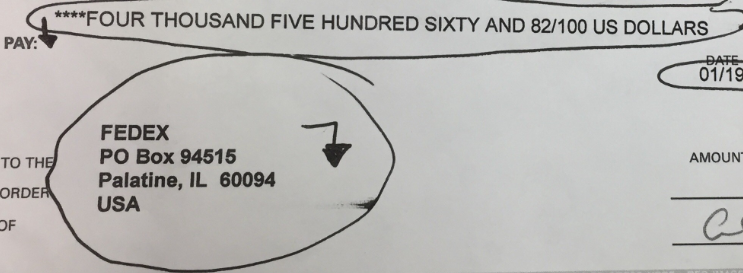
——————————
Archana K
Business Systems Analyst
American Labelmark Company (Labelmaster)
Chicago IL
——————————
——————————————- -
For alignment issues, you will need to adjust the layout of the form as noted earlier by Lewis. Either you can do it (if you have a developer’s license) or your partner can make the adjustments. It is fairly easy to just moved the text boxes around once you have the check open in Visual Studio or Report Builder.
——————————
Dave Wiser
Controller
Beckwith & Kuffel
Seattle WA
——————————
——————————————- -
M. Scott Beaton
MemberMarch 14, 2018 at 11:05 AM
Start with low-hanging fruit. Make sure that your Bank Card is set to Country US, and that all Vendors have the Country set to US if they are domestic vendors. This may remedy your issues, so test this first.I believe you can still adjust report layout formats even without a developer’s license. Start by noting the Report that you need to adjust. The Check report number is shown in the screen “Report Selection Bank Acc.” and typical US implementations will use Report 10401, but make sure you know which report YOUR company uses.
At this point, you will need to access the NAV Development Environment. This may be only installed on the server. Open the Object Designer, and find the Report Object for your company’s check layout. ****EXPORT THIS OBJECT AND SAVE IT**** so that you can undo any changes that might be undesirable. Unless you have Visual Studio installed, you will need to set the option to use the native report layout editor (I don’t have access to a NAV2013r2 environment for the specific names or menu path). You will then be able to design the object, then open the layout to adjust placement of the fields.
Check reports are some of the most time consuming parts of implementations that I’ve worked on. Some checks required adjustment of field location by fractions of a mm 7 times to get the format to match the bank’s requirements.
——————————
M. Scott Beaton
End User and former Consultant
Sanford FL
——————————
——————————————- -
Val Gameiro
MemberMarch 15, 2018 at 9:53 AM
Just know that printing checks is normally a pain, and takes a lot of trial and error to get it right.NAV 2013 reports are designed in Visual Studio, or Report Builder (which comes with NAV).
In Europe, no one prints checks anymore. It’s all electronic.
If you don’t have an Object Designer license, or a developer’s license, you won’t be able to modify the check, and you’ll have to ask your partner to do it for you.
It can be time consuming, and if you change printers, you may have to readjust the check again.
——————————
Val Gameiro
Advanced Business Systems, LLC
Implementer/Project Manager
Austin, Texas
former NAVUG Austin Chapter Leader
——————————
——————————————-
DSC Communities replied 8 years, 3 months ago 1 Member · 0 Replies -
-
0 Replies
Sorry, there were no replies found.
The discussion ‘Checks are not printing with the proper address format’ is closed to new replies.
