

Auto populate the Request Page No. field when report is run.

  • Auto populate the Request Page No. field when report is run.
    Posted by DSC Communities on September 13, 2018 at 3:31 pm
    • Vivian Mosher

      Member

      September 13, 2018 at 3:31 PM

      Hello!

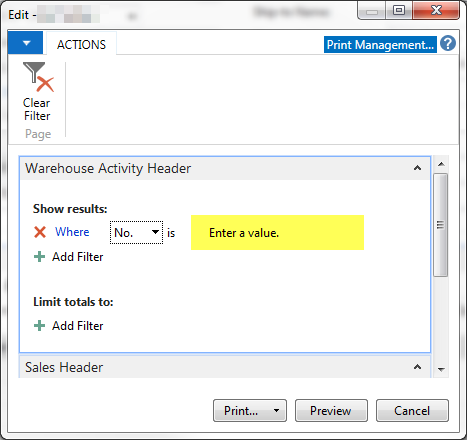
      I am having trouble figuring out how to auto populate the request page of a report with the No. when the report runs.Ā  There are many other reports where this populates with the number of the record that I am running it from.Ā  But I can’t find how those reports are pulling the number.Ā  I compared this report with the ones that work and I cannot see any difference.Ā  Is there a special setting or code that I need to add?Ā  I am using NAV 2016.Ā  Any help would be greatly appreciated!!!

      Example

      ——————————
      Thank you!
      Vivian
      ——————————

    • Matt McDowell

      Member

      September 13, 2018 at 4:02 PM

      Is this a custom report?

      If so I could only find out how to accomplish this with code. This applies if you’ve put the report as an action on a page:

      1. Open the page in Dev Enviroment, and open page actions.
      2. Open up C/AL editor on the OnAction() for your report action
      3. Add and modify the below code. In this case my report is based off a warehouse shipment, and my report is # 50043.

      WhseShipmentHeader.RESET;
      WhseShipmentHeader.SETRANGE(“No.”,”No.”);
      Ā  IF WhseShipmentHeader.FINDFIRST THEN
      REPORT.RUNMODAL(50043,TRUE,FALSE,WhseShipmentHeader);

      This requires a dev. license of course

      ?

      ——————————
      Matt McDowell
      Supply Chain Analyst
      Valley Blades Limited
      Waterloo ON
      ——————————
      ——————————————-

    • Kyle Hardin

      Member

      September 14, 2018 at 7:37 AM

      I agree with Matt – this can only be fixed in code. But I will clarify one of the points he is making.

      This is not a problem with the report itself. The problem is happening from wherever the report is being called, meaning the Action on a Page, or someplace in the code during posting the Warehouse Receipt that prints this report. That code (wherever it is) needs to tell the report what filters to use, and that will make sure that No. is populated correctly.

      ——————————
      Kyle Hardin
      NAV Developer
      ArcherPoint Inc.
      Atlanta GA
      ——————————
      ——————————————-

    • Vivian Mosher

      Member

      September 17, 2018 at 10:07 AM

      Thank you both!Ā  That was where the issue was.

      ——————————
      Thank you!
      Vivian
      ——————————
      ——————————————-

    DSC Communities replied 7 years, 6 months ago 1 Member · 0 Replies
  • 0 Replies

Sorry, there were no replies found.

The discussion ‘Auto populate the Request Page No. field when report is run.’ is closed to new replies.

Start of Discussion
0 of 0 replies June 2018
Now

Welcome to our new site!

Here you will find a wealth of information created for peopleĀ  that are on a mission to redefine business models with cloud techinologies, AI, automation, low code / no code applications, data, security & more to compete in the Acceleration Economy!



